

import pandas as pd # pandas is a library for data manipulation
import matplotlib.pyplot as plt # matplotlib is a library for data visualisation
import numpy as np # numpy is a library for numerical computing
from pathlib import Path # pathlib is a library for working with file pathsPractical 2: Recognising and plotting probability distributions
Exploring student attainment in schools
This week is focussed on linking probability distributions to the data using some common functions in Python/R.
Learning Outcomes
- Load and tidy a new dataset, building on what you did in Practical 1.
- Plot histograms and recognise the features of a normal distribution.
- Use Q-Q plots to check whether a dataset is (approximately) normally distributed.
- Standardise a variable into z-scores, and use them to flag unusual values.
- Use a fitted normal distribution to calculate probabilities, and compare them with what’s actually in the data.
Starting the Practical
As per last week, download the notebook to your chosen folder, then open JupyterLab (which will be running in Podman/Docker), or VS Code, to run the code yourself.
Optionally if you want to save the completed notebook to your Github repo, you can add, commit, and push the notebook in Git after you download it. When you’re done for the day, save your changes to the file (This is very important!), then add, commit, and push your work to save the completed notebook.
Task 1 — Import the packages (if using Python)
We are going to import some common python packages.
Task 2 — Read the data in
We are going to look at schools performance data in England.
The data is sourced from gov.uk here - HOWEVER I have also saved a copy of the relevant dataset to the Github repo which you can load directly in the code below. In this notebook we’re using the performance table for academic year 2022/23: ‘Performancetables_130242/2022-2023’.
If you do want to download the data directly from the gov.uk website then you need to choose the academic year ‘2022 to 2023’, then ‘All of England’, then ‘Key stage 4 results (final)’. Then you’ll want to download the ‘Data in CSV format’ and also ‘Explanation of terminology used in the data files’.
def find_qm_root(start_path: Path = Path.cwd(), anchor: str = "_quarto.yml") -> Path:
    """Walk up from start_path until we find the folder holding _quarto.yml."""
    for parent in [start_path] + list(start_path.parents):
        if (parent / anchor).exists() or parent.name == anchor:
            return parent
    raise FileNotFoundError(f"Anchor '{anchor}' not found in path hierarchy.")

# Read CSV file, handling common missing value entries
na_vals = ["", "NA", "SUPP", "NP", "NE", "SP", "SN", "SUPPMAT"]
df_ks4 = pd.read_csv(find_qm_root() / "sessions" / "data" / "Performancetables_130242" / "2022-2023" / "england_ks4final.csv",
    na_values = na_vals
)
<string>:1: DtypeWarning: Columns (75,77,78,79,80,81,82,83,84,85,86,87,88,89,90,91,92,93,94,144,145,146,147,148,149,150,151,152,177,178,179,180,181,182,183,186,187,188,189,190,191,192,194,195,196,198,199,200,202,203,204,206,207,208,210,211,212,214,215,216,218,219,220,222,223,224,230,233,234,235,236,237,238,239,242,243,244,245,246,247,248,251,252,253,254,255,256,257,266,267,268,269,270,271,272,281,282,283,284,285,286,287,296,297,298,299,300,301,302,311,312,313,314,315,316,317,335,336,337,340,341,342,345,346,347,366,367,368,369,370,371,372,373,374,375,376,377,378,379,380,381,382,383,384,385,386,387,388,389,390,391,392,393,394,395,396,397,398,399,400,401,402,403,404,405,406,407,408,409,410) have mixed types. Specify dtype option on import or set low_memory=False.info_cols = ['RECTYPE', 'LEA', 'SCHNAME', 'TOTPUPS']
ebaccs_cols = ['EBACCAPS', 'EBACCAPS_LO', 'EBACCAPS_MID', 'EBACCAPS_HI']
df = df_ks4[info_cols + ebaccs_cols]
# work on a copy of the dataframe to avoid SettingWithCopyWarning
df = df.copy()
df.head() RECTYPE LEA ... EBACCAPS_MID EBACCAPS_HI
0 1 201.0 ... NaN NaN
1 1 201.0 ... NaN NaN
2 1 201.0 ... NaN NaN
3 4 201.0 ... NaN NaN
4 1 202.0 ... 3.81 6.87
[5 rows x 8 columns]Warning: One or more parsing issues, call `problems()` on your data frame for details,
e.g.:
dat <- vroom(...)
problems(dat)# A tibble: 6 × 8
RECTYPE LEA SCHNAME TOTPUPS EBACCAPS EBACCAPS_LO EBACCAPS_MID EBACCAPS_HI
<dbl> <dbl> <chr> <chr> <dbl> <dbl> <dbl> <dbl>
1 1 201 City of L… 1045 2.1 NA NA NA
2 1 201 City of L… 739 1.51 NA NA NA
3 1 201 David Gam… 365 0.56 NA NA NA
4 4 201 <NA> 0 NA NA NA NA
5 1 202 Acland Bu… 1163 4.62 1.91 3.81 6.87
6 1 202 The Camde… 1047 6.25 NA 5.4 7.21You might be wondering why I’ve chosen the columns info_cols and ebaccs_cols. In open source datasets the column headers might be obscure, or difficult to decipher - but typically metadata will be provided that explains the meaning.
Looking at the metadata (which you can see in ‘../data/ks4_meta.xlsx’) we can see the full meaning of each column header:
| Variable name | Meaning |
|---|---|
| RECTYPE | Record type (1=mainstream school; 2=special school; 4=local authority; 5=National (all schools); 7=National (maintained schools)) |
| LEA | Local authority |
| SCHNAME | School name |
| TOTPUPS | Number of pupils on roll (all ages) |
| EBACCAPS | Average EBacc APS score per pupil |
| EBACCAPS_LO | Average EBacc APS score per pupil with low prior attainment |
| EBACCAPS_MID | Average EBacc APS score per pupil with middle prior attainment |
| EBACCAPS_HI | Average EBacc APS score per pupil with high prior attainment |
EBacc stands for English Baccalaureate. It is a measure of students school grades calculated as an average score across a set number of subjects. It is used by the government as a performance indicator of English schools. You can read more about it here.
The EBacc has a minimum score of 0, which indicates very poor performance, and a maximum score of 9, which indicates very high performance.
Tidying up
Before we can plot anything, this file needs the same two checks you already did properly last week - data types, and which rows actually belong in the data.
df.dtypesRECTYPE int64
LEA float64
SCHNAME object
TOTPUPS object
EBACCAPS float64
EBACCAPS_LO float64
EBACCAPS_MID float64
EBACCAPS_HI float64
dtype: objectglimpse(df)Rows: 5,812
Columns: 8
$ RECTYPE <dbl> 1, 1, 1, 4, 1, 1, 1, 1, 1, 1, 2, 1, 1, 1, 1, 1, 1, 1, 1, …
$ LEA <dbl> 201, 201, 201, 201, 202, 202, 202, 202, 202, 202, 202, 20…
$ SCHNAME <chr> "City of London School", "City of London School for Girls…
$ TOTPUPS <chr> "1045", "739", "365", "0", "1163", "1047", "596", "227", …
$ EBACCAPS <dbl> 2.10, 1.51, 0.56, NA, 4.62, 6.25, 0.03, 2.43, NA, 3.92, 0…
$ EBACCAPS_LO <dbl> NA, NA, NA, NA, 1.91, NA, NA, NA, NA, 2.43, 0.00, 1.75, 3…
$ EBACCAPS_MID <dbl> NA, NA, NA, NA, 3.81, 5.40, NA, NA, NA, 3.90, NA, 3.99, 4…
$ EBACCAPS_HI <dbl> NA, NA, NA, NA, 6.87, 7.21, NA, NA, NA, 5.99, NA, 5.80, 5…df.loc[:, ebaccs_cols] = df.loc[:, ebaccs_cols].apply(pd.to_numeric, errors='coerce')
df['TOTPUPS'] = pd.to_numeric(df['TOTPUPS'], errors='coerce').fillna(0).astype('int64')df <- df |>
mutate(across(all_of(ebaccs_cols), ~ parse_number(as.character(.x))),
TOTPUPS = replace_na(parse_number(as.character(TOTPUPS)), 0))Warning: There was 1 warning in `mutate()`.
ℹ In argument: `TOTPUPS = replace_na(parse_number(as.character(TOTPUPS)), 0)`.
Caused by warning:
! 58 parsing failures.
row col expected actual
137 -- a number NEW
161 -- a number NEW
396 -- a number NEW
414 -- a number NEW
503 -- a number NEW
... ... ........ ......
See problems(...) for more details.# record types 4, 5 and 7 are aggregated local authority / national rows,
# not individual schools - keep 1 (mainstream) and 2 (special) only
df = df[df['RECTYPE'].isin([1, 2])].copy()
rows, cols = df.shape
print(f"Rows: {rows}, Columns: {cols}")Rows: 5657, Columns: 8Task 3 — Plot the distribution
Let’s try plotting the Average EBacc APS score per pupil.
n_bins = 10
fig, ax = plt.subplots(figsize=(12, 8))

ax.hist(df['EBACCAPS'].dropna(), bins=n_bins, color='#abc766', edgecolor='black')
ax.set_title('EBacc distribution')
ax.set_xlabel('EBacc score')
ax.set_ylabel('Number of schools')
ax.set_xlim(0,9) # the EBacc has a maximum score of 9
(0.0, 9.0)plt.show()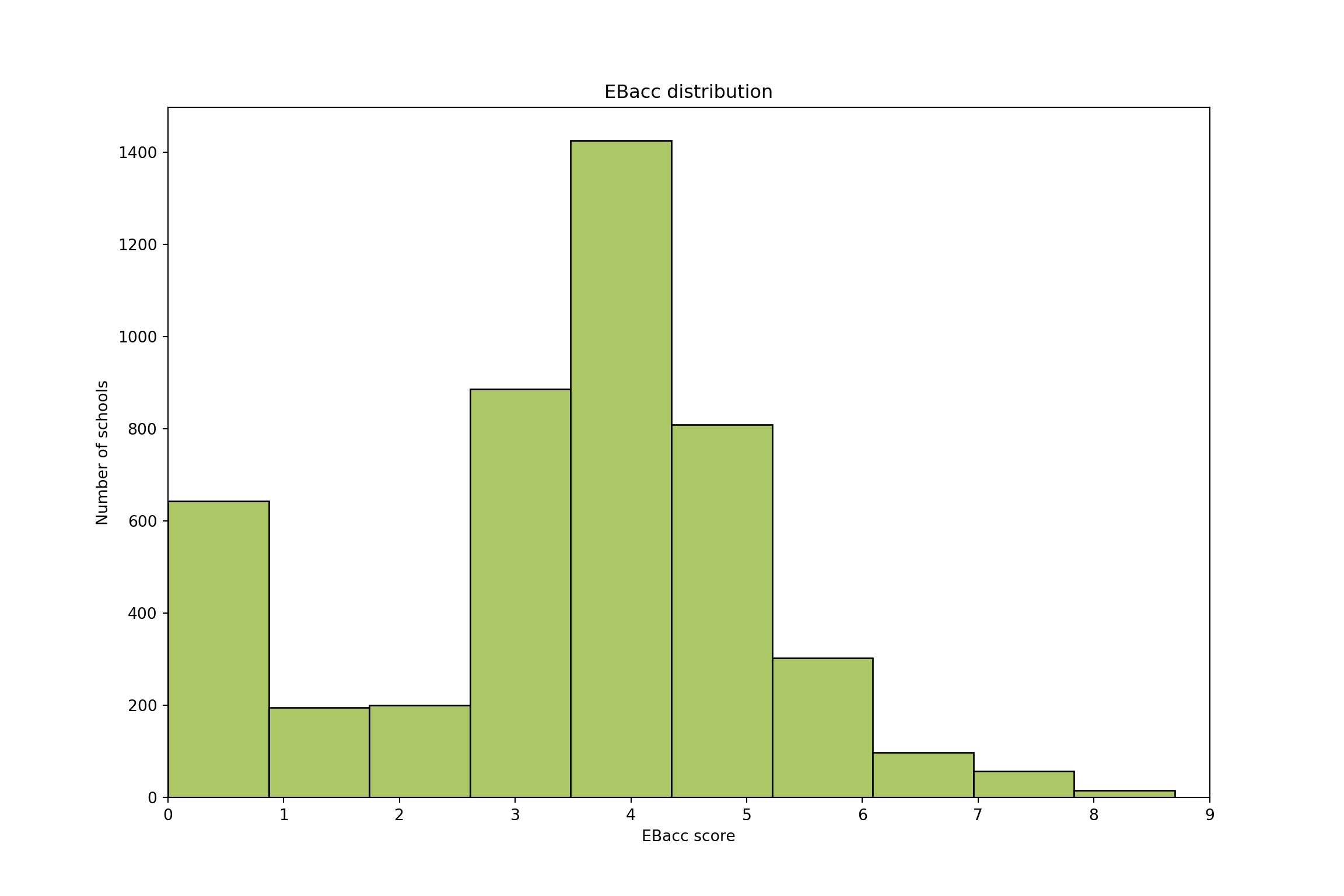
ggplot(df, aes(x = EBACCAPS)) +
  geom_histogram(bins = 10, fill = "#abc766", colour = "black") +
  labs(title = "EBacc distribution", x = "EBacc score", y = "Number of schools") +
  xlim(0, 9) + # the EBacc has a maximum score of 9
  theme_minimal()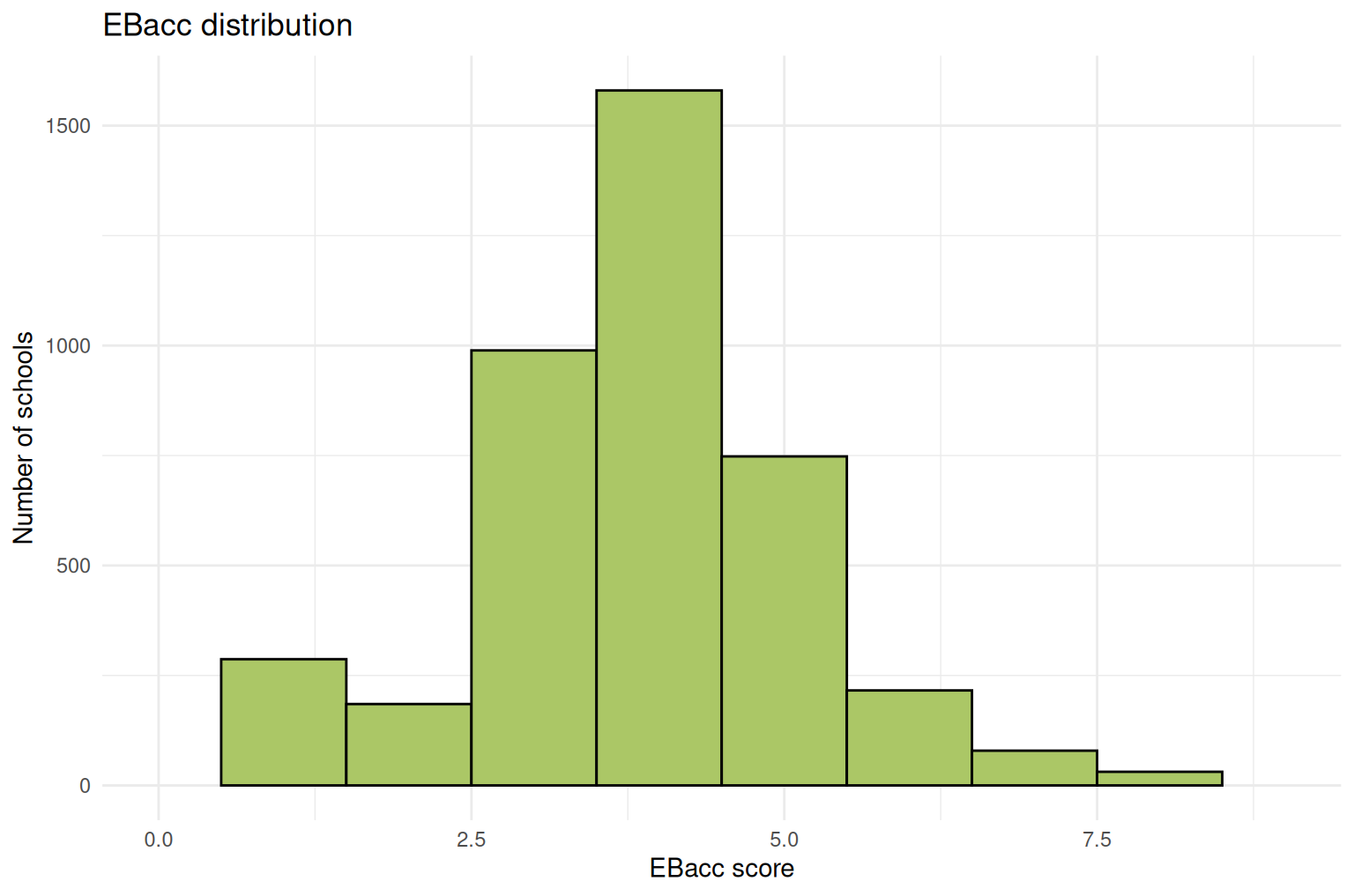
What do you observe from this histogram? Because the bins are quite large it’s difficult to get a sense of the distribution - try changing this to get a better idea of the data spread.
n_bins = ??
fig, ax = plt.subplots(figsize=(12, 8))

ax.hist(df['EBACCAPS'].dropna(), bins=n_bins, color='#abc766', edgecolor='black')
ax.set_title('EBacc distribution')
ax.set_xlabel('EBacc score')
ax.set_ylabel('Number of schools')
ax.set_xlim(0,9) # the EBacc has a maximum score of 9

plt.show()
n_bins = 40
fig, ax = plt.subplots(figsize=(12, 8))
ax.hist(df['EBACCAPS'].dropna(), bins=n_bins, color='#abc766', edgecolor='black')
ax.set_title('EBacc distribution')
ax.set_xlabel('EBacc score')
ax.set_ylabel('Number of schools')
ax.set_xlim(0,9) # the EBacc has a maximum score of 9(0.0, 9.0)plt.show()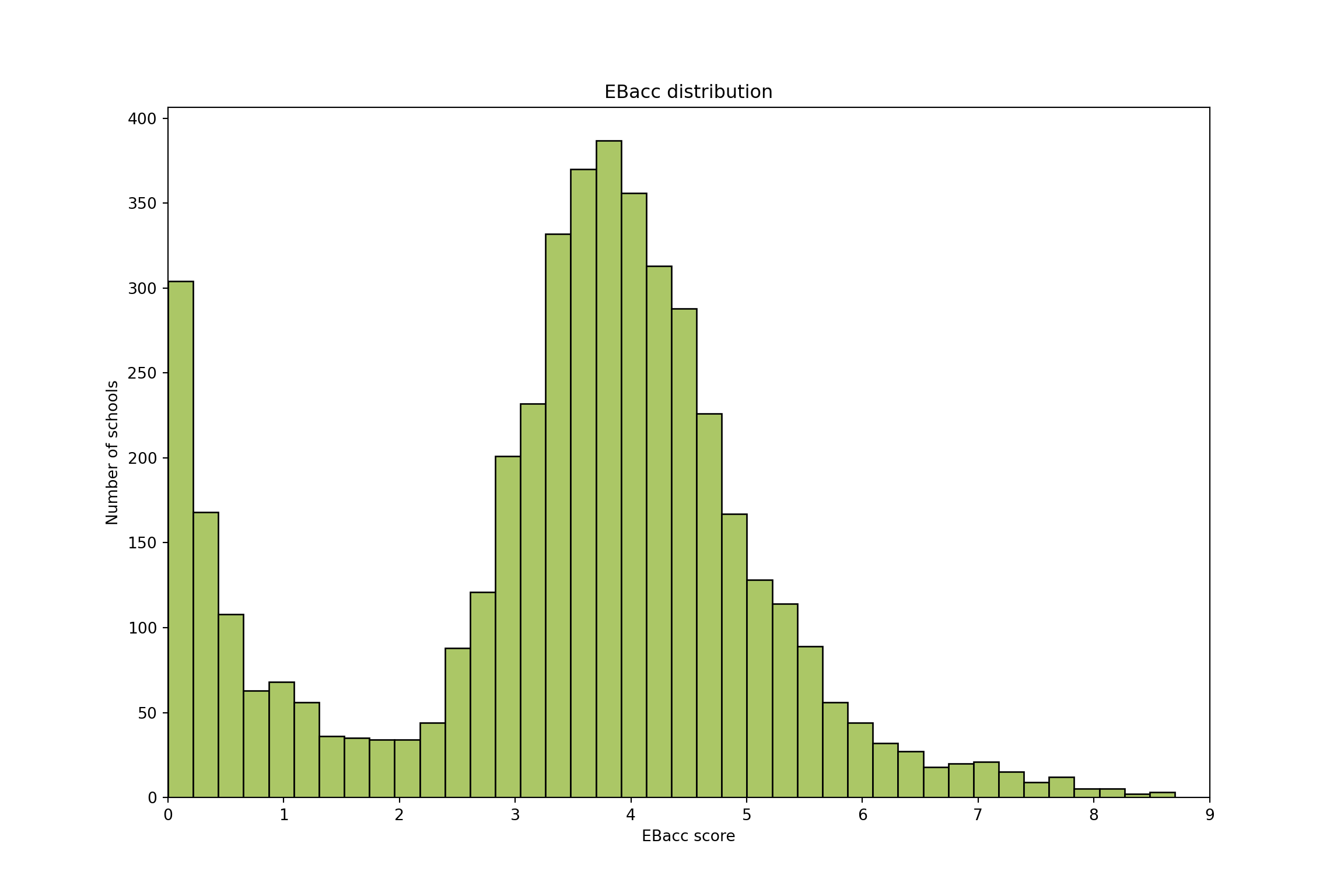
Task 4 — Check for normality
Looking at the histogram does the data look normally distributed?
Remember the key features of the normal distribution:
- Data is continuous
- it is something you measure not something you count
- Data is equally likely to be larger or smaller than average
- symmetric
- Characteristic size, all data points are close to the mean
- single peak
- There is less data further away from the mean
- smooth tails on both sides
One way to consider whether it is normally distributed is to overlay the normal distribution on top.
In Python we can use the package scipy.stats which has functions for generating probability density functions for common distributions. You can see which common distributions here.
import scipy.stats as sps # scipy.stats is a library for statistical functions

# first let's get the mean and stand deviation
mu = df['EBACCAPS'].dropna().mean()
std = df['EBACCAPS'].dropna().std()

## Create the plot

# plot the histogram
plt.figure(figsize=(12, 8))
plt.hist(df['EBACCAPS'], bins=40, density=True, color='#abc766', edgecolor='black')

# plot the Probability Density Function (PDF)
xmin = 0
xmax = 9
x = np.linspace(xmin, xmax, 100)
p = sps.norm.pdf(x, mu, std)
plt.plot(x, p, linewidth=2, color="#e16fca")

plt.title(f"Fit results: $\\mu$ = {mu:.2f},  $\\sigma$ = {std:.2f}")
plt.xlim(0, 9)
(0.0, 9.0)plt.xlabel("EBacc score")
plt.ylabel("Density")
plt.show()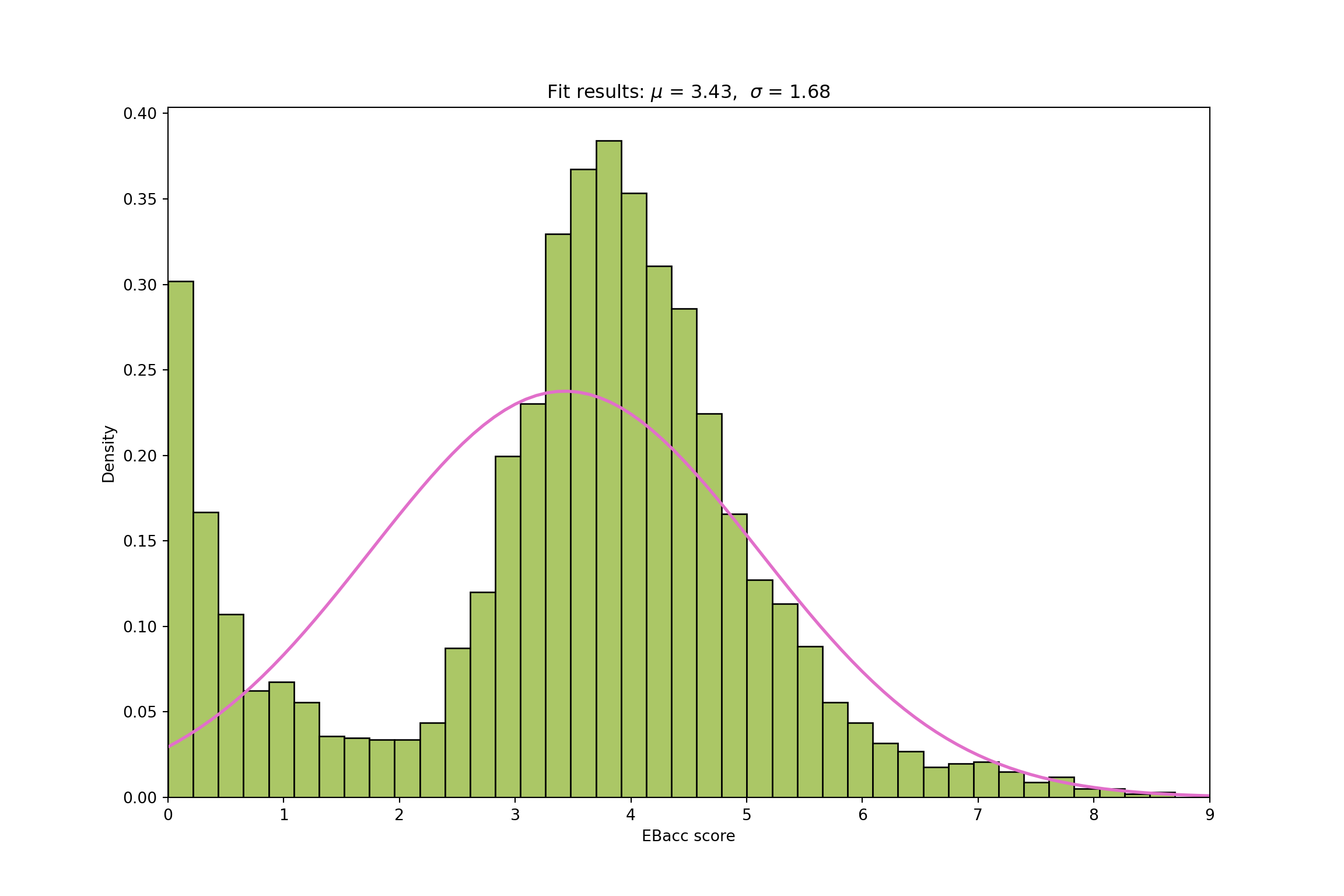
# first let's get the mean and standard deviation
mu  <- mean(df$EBACCAPS, na.rm = TRUE)
std <- sd(df$EBACCAPS, na.rm = TRUE)

# the Probability Density Function (PDF), evaluated over the score range
x <- seq(0, 9, length.out = 100)
pdf_df <- tibble(x = x, density = dnorm(x, mu, std))

ggplot(df, aes(x = EBACCAPS)) +
  geom_histogram(aes(y = after_stat(density)), bins = 40,
                 fill = "#abc766", colour = "black") +
  geom_line(data = pdf_df, aes(x = x, y = density),
            colour = "#e16fca", linewidth = 1, inherit.aes = FALSE) +
  labs(title = sprintf("Fit results: mu = %.2f,  sigma = %.2f", mu, std),
       x = "EBacc score", y = "Density") +
  xlim(0, 9) +
  theme_minimal()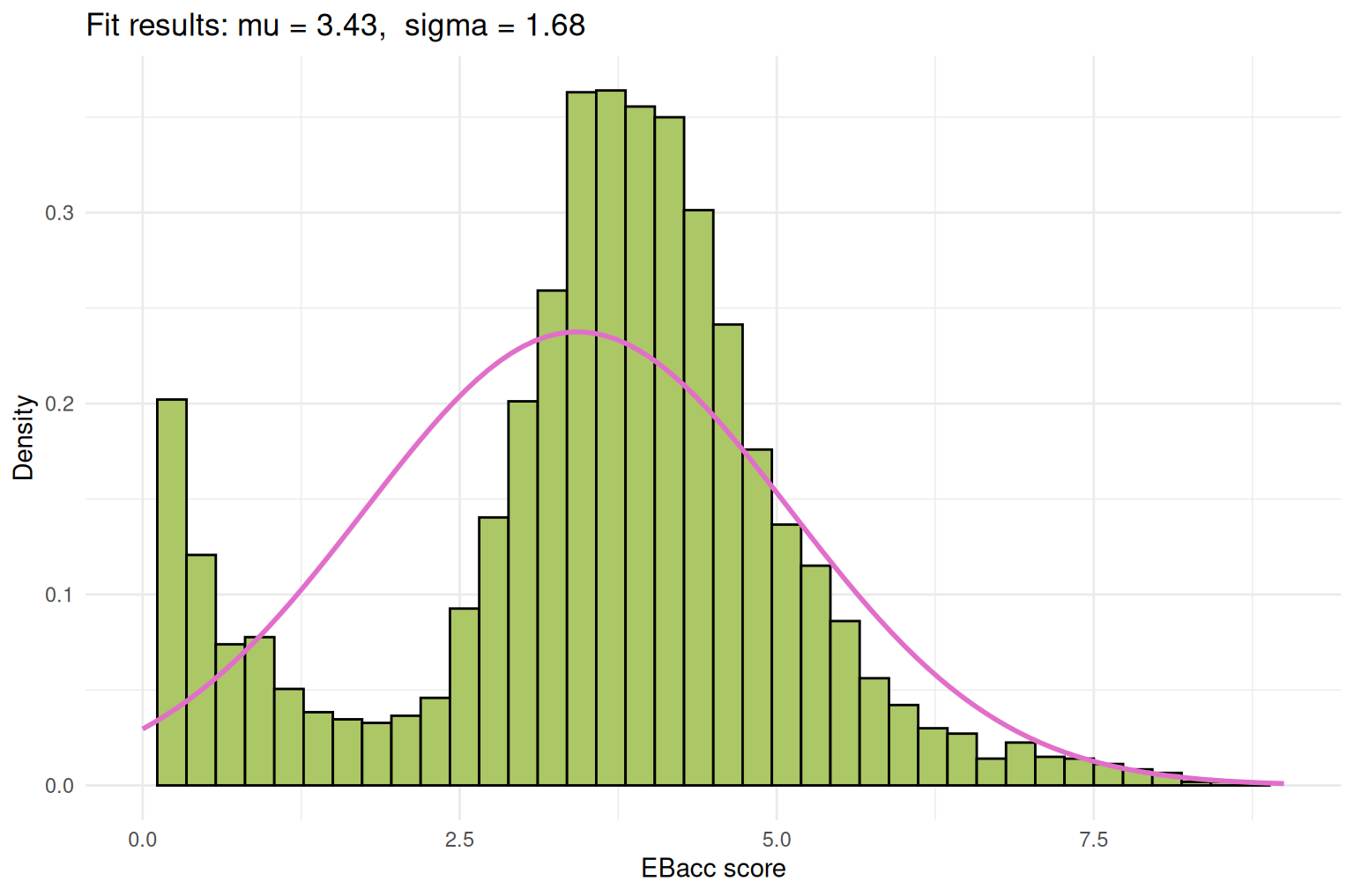
Note that this time we plot the histogram with density=True - this scales the histogram data.
Another way to think about whether something is normally distirbuted is to look at the Q-Q plot.
Q-Q plot
A Q-Q plot is used to compare two probability distributions, by comparing their quantiles.It can be used to see if data follows a normal distribution. You can read a bit more about Q-Q plots here.
Thinking about the characteristics of a normal distribution, what would you expect the Q-Q plot of perfectly normally distributed dataset to look like?
If the data is normally distributed, the points in the Q-Q plot will lie close to a straight diagonal line. This happens because the quantiles of the sample match the quantiles of the theoretical normal distribution.
The results of the Q-Q plot can help us to understand the dataset:
- For perfectly normal data: points fall almost exactly on the diagonal line
- Heavy tails (more extreme values than normal): points curve away at the end
- Light tails (fewer extreme values than normal): points bend inward at the ends
- Skewed data: points systematically deviate above or below the line
We can plot the Q-Q plot ourselves. Note that before we Q-Q plot the sample data we will need to normalise it - this accounts for the fact that our data is not centred around 0. We will shortly (Task 6) look at normalising the data more explictly.
# Drop missing values
data = df['EBACCAPS'].dropna().values
n = len(data)

# normalise the data
data = (data - np.mean(data)) / np.std(data)

# Sort the sample data
sample_quantiles = np.sort(data)

# Compute plotting positions (probabilities)
p = (np.arange(1, n+1) - 0.5) / n

# Compute theoretical quantiles from standard normal
theoretical_quantiles = sps.norm.ppf(p)

# Plot
plt.scatter(theoretical_quantiles, sample_quantiles, alpha=0.5, color='#abc766')
plt.plot(theoretical_quantiles, theoretical_quantiles, color='black', linestyle='--')  # reference line
plt.title("Q-Q plot for EBacc scores")
plt.xlabel("Theoretical quantiles (Normal)")
plt.ylabel("Sample quantiles")

plt.show()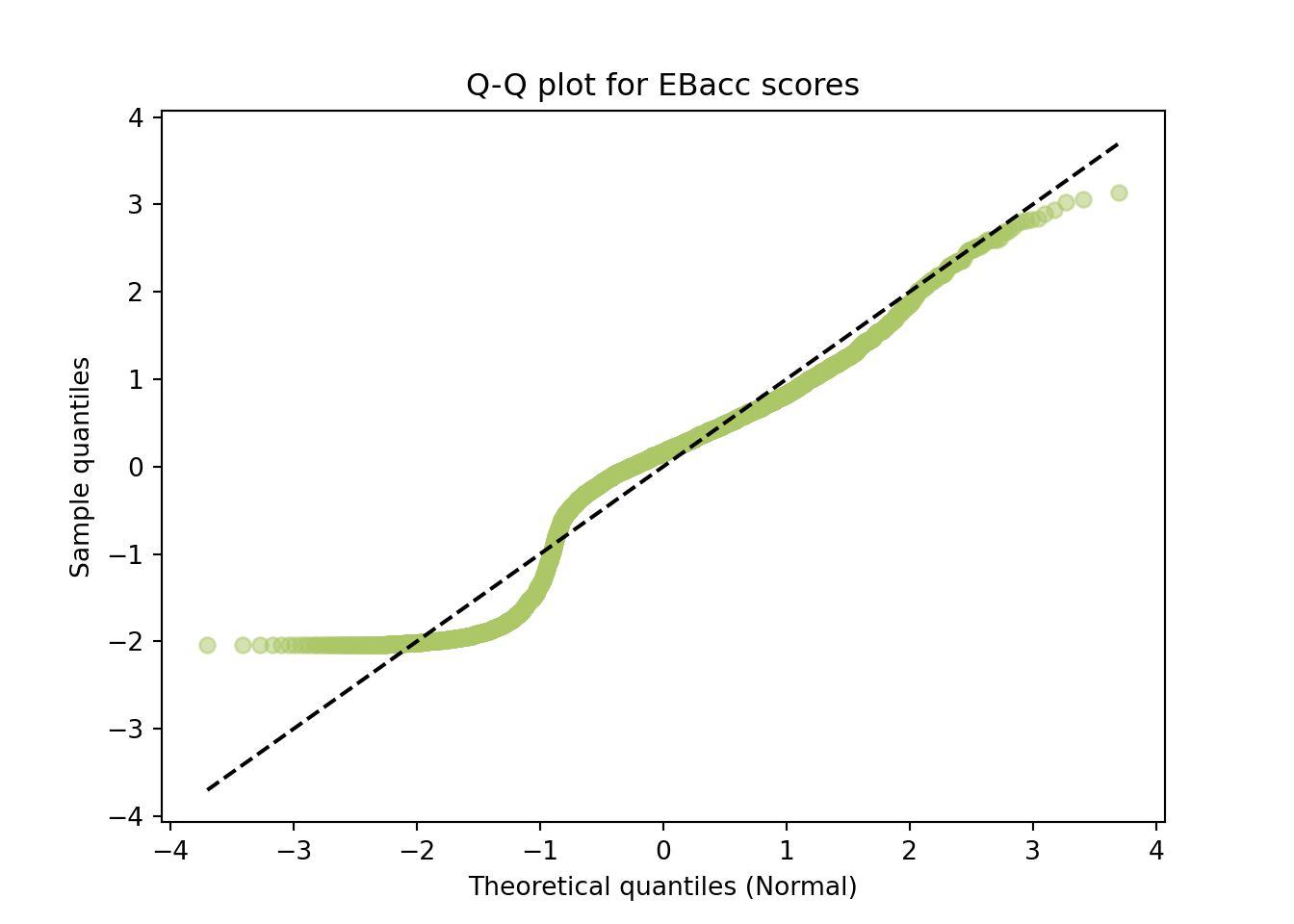
# Drop missing values
data <- na.omit(df$EBACCAPS)
n <- length(data)

# normalise the data
data <- (data - mean(data)) / sd(data)

# Sort the sample data
sample_quantiles <- sort(data)

# Compute plotting positions (probabilities)
p <- (seq_len(n) - 0.5) / n

# Compute theoretical quantiles from standard normal
theoretical_quantiles <- qnorm(p)

# Plot
tibble(theoretical_quantiles, sample_quantiles) |>
  ggplot(aes(x = theoretical_quantiles, y = sample_quantiles)) +
  geom_point(alpha = 0.5, colour = "#abc766") +
  geom_abline(slope = 1, intercept = 0, colour = "black", linetype = "dashed") +
  labs(title = "Q-Q plot for EBacc scores",
       x = "Theoretical quantiles (Normal)", y = "Sample quantiles") +
  theme_minimal()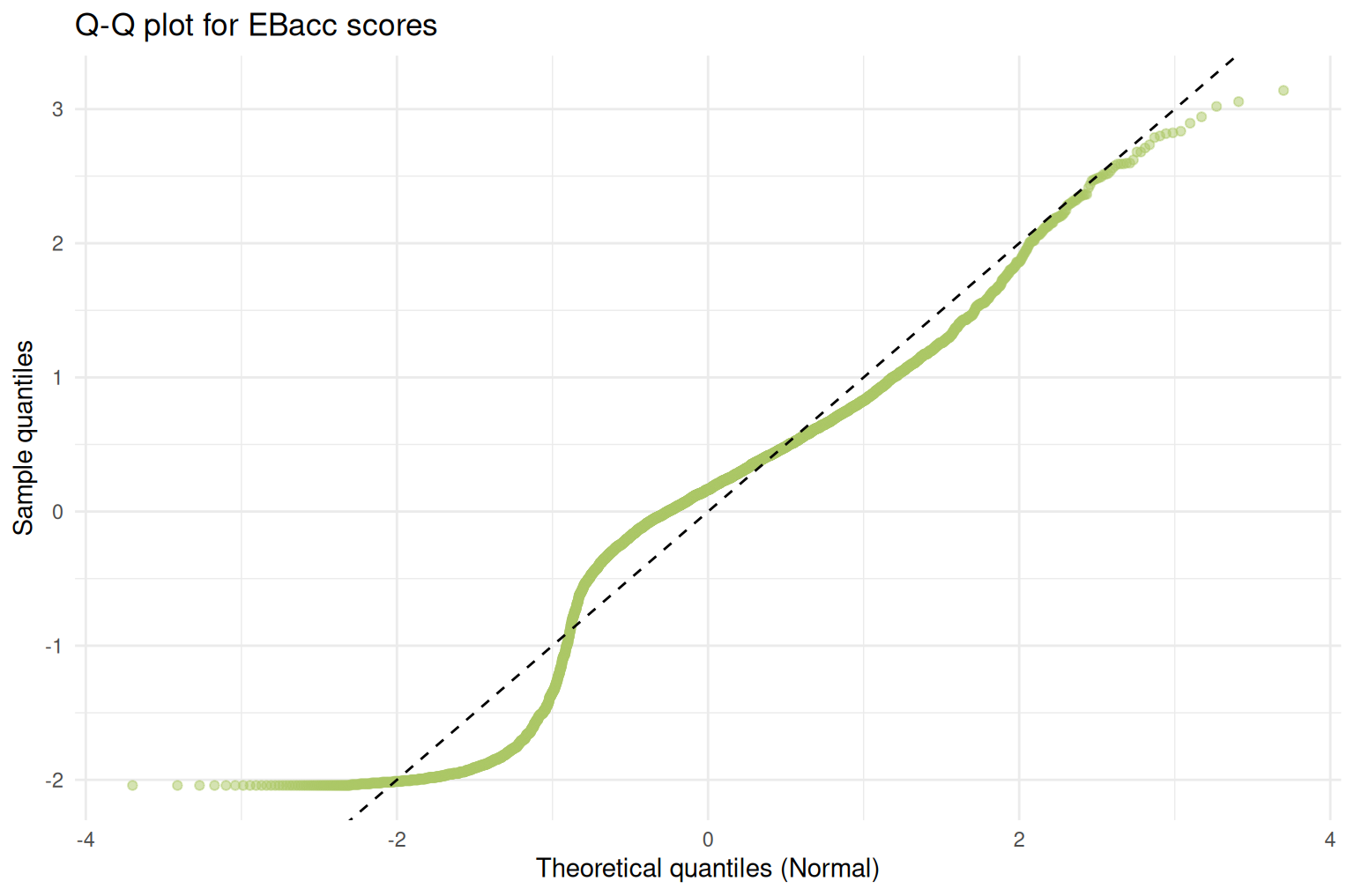
Ok, so in case it wasn’t clear from the previous plot we can see that the data definitely isn’t perfectly normal.
Task 5 — Explain the skew
If you remember above this dataset includes schools of two different types, we have mainstream schools and special schools. ‘special schools’ refers to schools which cater to students with special educational needs. Let’s see what happens when we split our histogram according to the type of school.
# histogram of # plot histogram of EBACCAPS by RECTYPE
n_bins = {1:40, 2:20}
fig, ax = plt.subplots(figsize=(12, 8))
for rectype, color, label in zip([1, 2], ['#abc766', '#66c2ab'], ['Mainstream', 'Special']):
    ax.hist(df_ks4.loc[df_ks4['RECTYPE'] == rectype, 'EBACCAPS'].dropna(), bins=n_bins[rectype], alpha=0.7, color=color, edgecolor='black', label=label)
ax.set_title('EBacc distribution by school type')
ax.set_xlabel('EBacc score')
ax.set_ylabel('Number of schools')
ax.set_xlim(0,9)
(0.0, 9.0)ax.legend()
plt.show()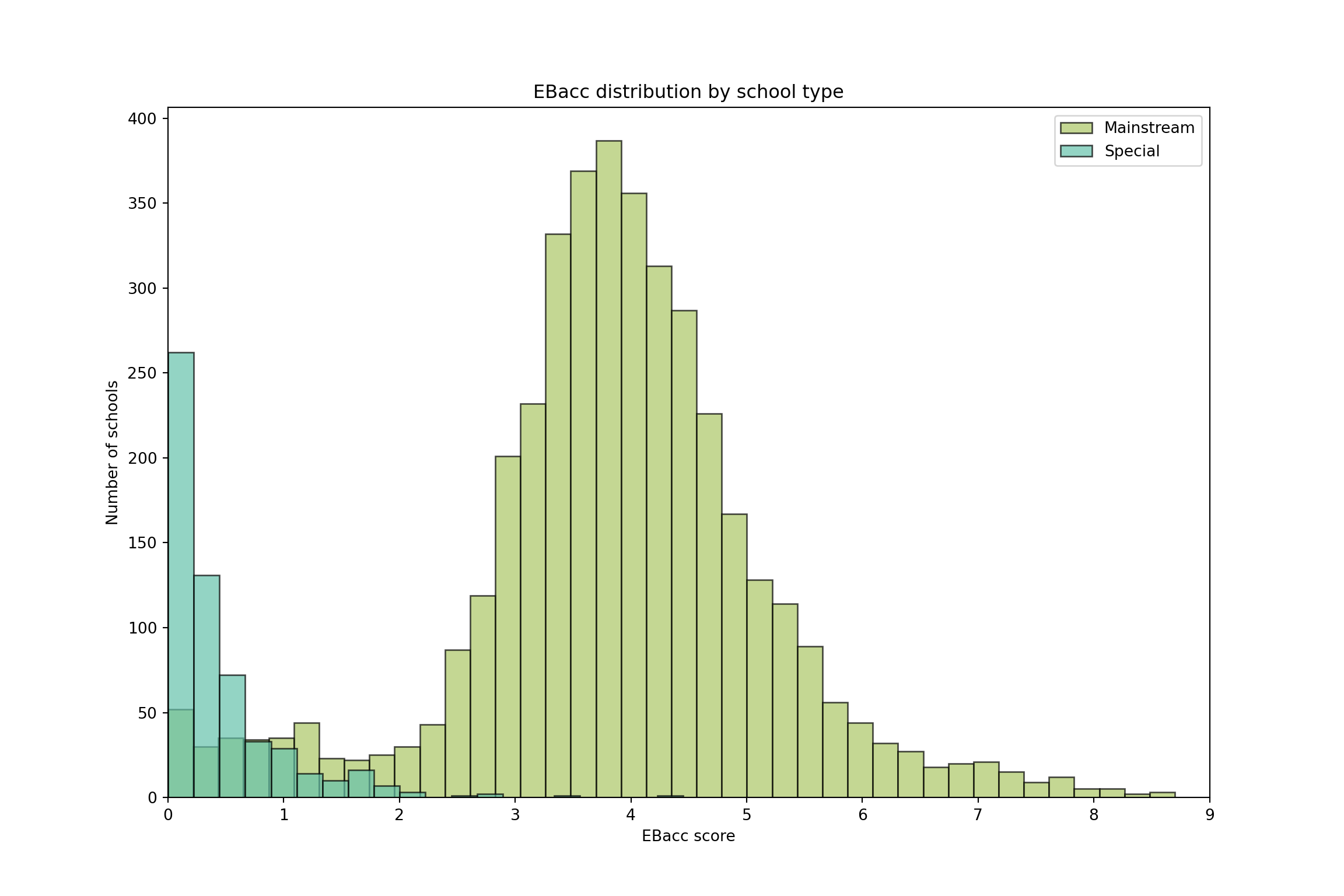
# note the different bin counts for each group, so the histograms look nice
mainstream_h <- df_ks4 |> filter(RECTYPE == 1) |> drop_na(EBACCAPS)
special_h    <- df_ks4 |> filter(RECTYPE == 2) |> drop_na(EBACCAPS)

ggplot() +
  geom_histogram(data = mainstream_h, aes(x = EBACCAPS, fill = "Mainstream"),
                 bins = 40, alpha = 0.7, colour = "black") +
  geom_histogram(data = special_h, aes(x = EBACCAPS, fill = "Special"),
                 bins = 20, alpha = 0.7, colour = "black") +
  scale_fill_manual(values = c("Mainstream" = "#abc766", "Special" = "#66c2ab"),
                     name = NULL) +
  labs(title = "EBacc distribution by school type",
       x = "EBacc score", y = "Number of schools") +
  xlim(0, 9) +
  theme_minimal()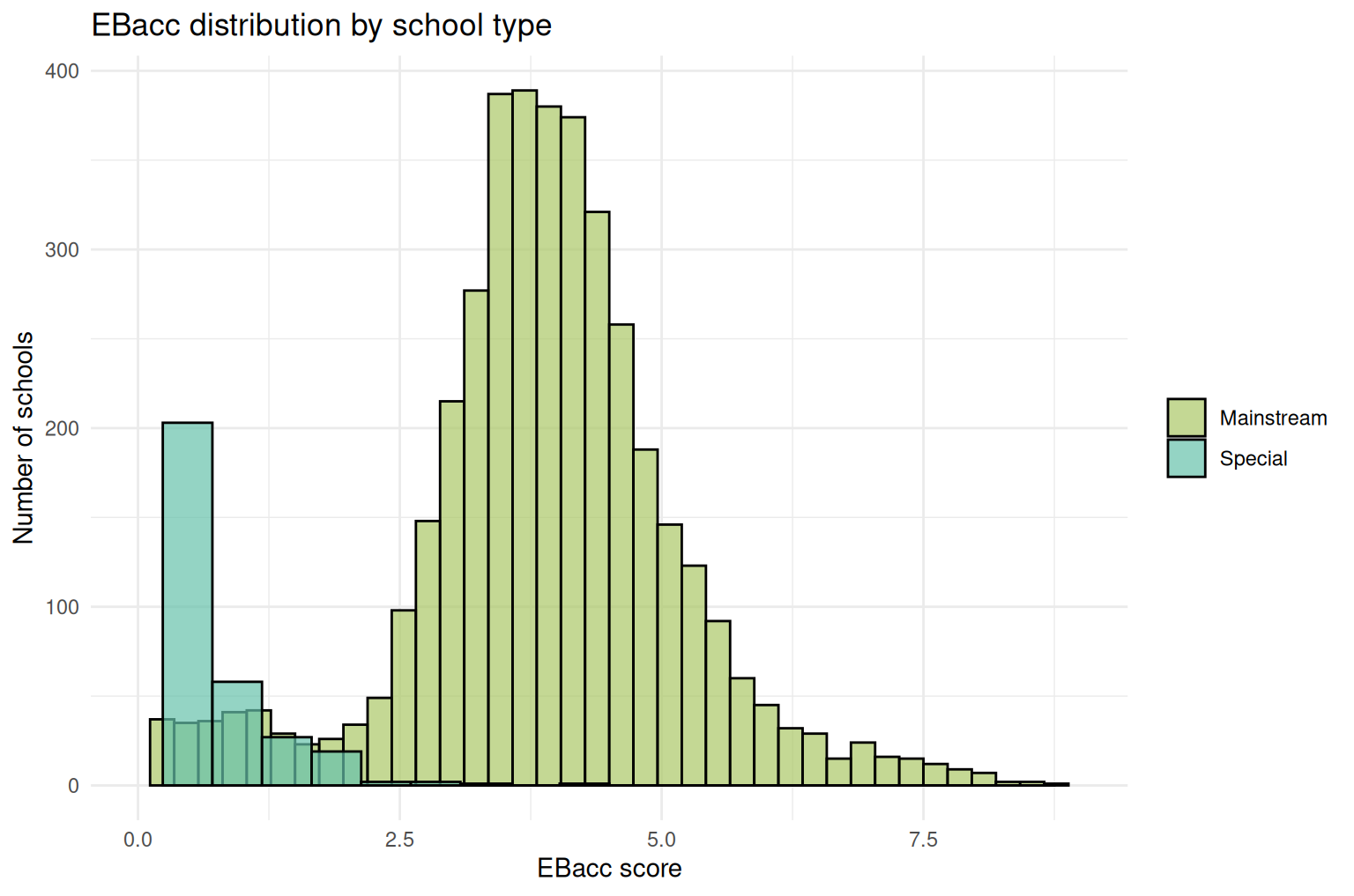
Note that I’ve played with the number of total bins for each group so that the histograms look nice.
Looking now at the histogram it becomes clear that the skewness of the data is caused by the different school types.
Splitting the data by school type
Let’s try again to see if the data is normal - this time splitting the dataset according to the school type.
Split the dataset according to the school type.
# mainstream school
df1 = df[??]

# special schools
df2 = df[??]
# mainstream school
df1 <- df[??]
# special schools
df2 <- df[??]# mainstream school
df1 = df[??]
# special schools
df2 = df[??]# mainstream school
df1 <- df[??]
# special schools
df2 <- df[??]# mainstream school
df1 = df[df['RECTYPE'] == 1].copy()
# special schools
df2 = df[df['RECTYPE'] == 2].copy()Q-Q plot for mainstream schools
# Drop missing values
data = df1['EBACCAPS'].dropna().values
n = len(data)

# normalise the data
data = (data - np.mean(data)) / np.std(data)

# Sort the sample data
sample_quantiles = ??

# Compute plotting positions (probabilities)
p = ??

# Compute theoretical quantiles from standard normal
theoretical_quantiles = ??

# Plot
plt.scatter(theoretical_quantiles, sample_quantiles, alpha=0.5, color='#abc766')
plt.plot(theoretical_quantiles, theoretical_quantiles, color='black', linestyle='--')  # reference line
plt.title("Mainstream schools: Q-Q plot for EBacc scores")
plt.xlabel("Theoretical quantiles (Normal)")
plt.ylabel("Sample quantiles")

plt.show()
# Drop missing values
data = df1['EBACCAPS'].dropna().values
n = len(data)
# normalise the data
data = (data - np.mean(data)) / np.std(data)
# Sort the sample data
sample_quantiles = np.sort(data)
# Compute plotting positions (probabilities)
p = (np.arange(1, n+1) - 0.5) / n
# Compute theoretical quantiles from standard normal
theoretical_quantiles = sps.norm.ppf(p)
# Plot
plt.scatter(theoretical_quantiles, sample_quantiles, alpha=0.5, color='#abc766')
plt.plot(theoretical_quantiles, theoretical_quantiles, color='black', linestyle='--') # reference line
plt.title("Mainstream schools: Q-Q plot for EBacc scores")
plt.xlabel("Theoretical quantiles (Normal)")
plt.ylabel("Sample quantiles")
plt.show()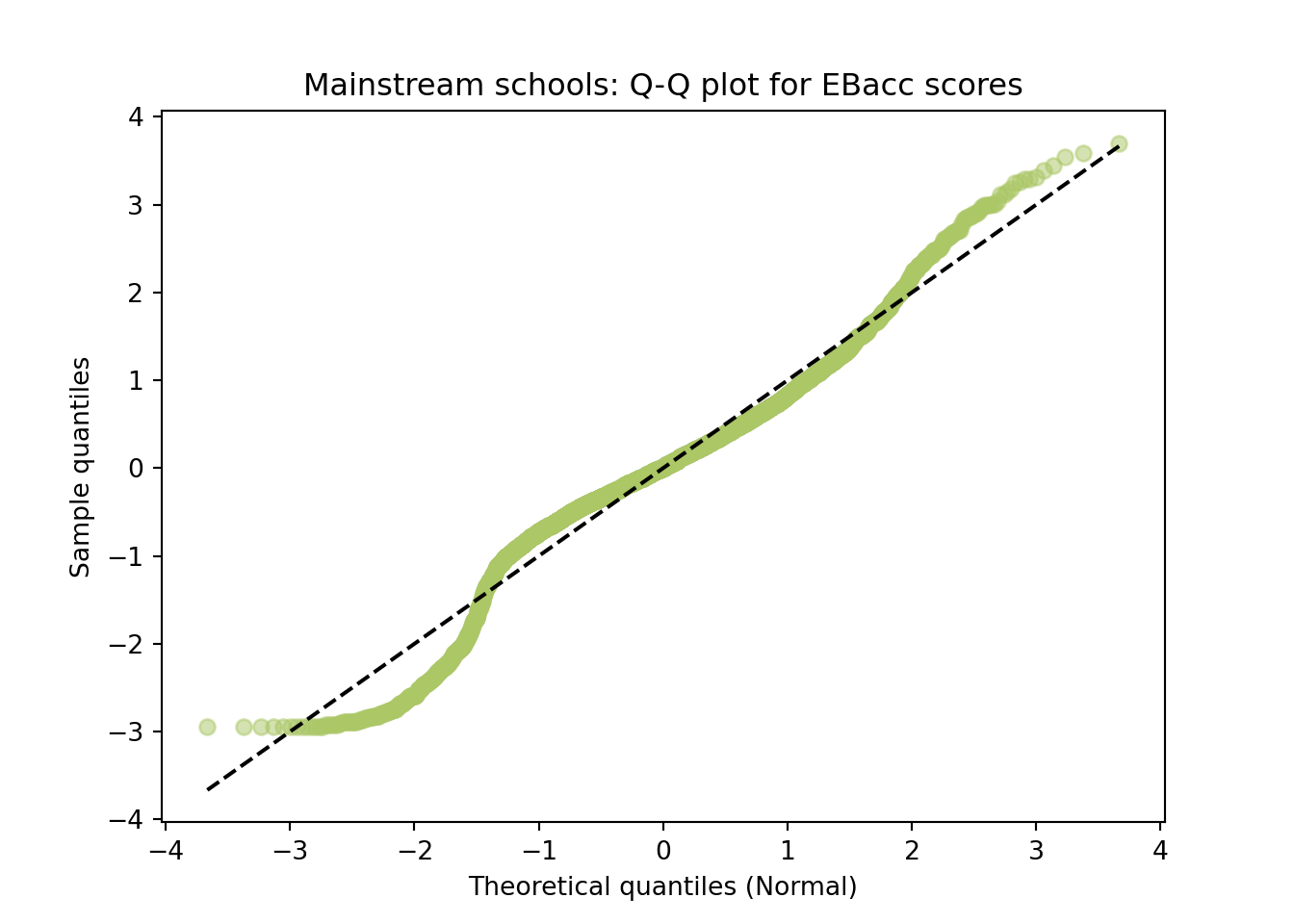
Q-Q plot for special schools
# Drop missing values
data = df2['EBACCAPS'].dropna().values
n = len(data)

# normalise the data
data = (data - np.mean(data)) / np.std(data)

# Sort the sample data
sample_quantiles = ??

# Compute plotting positions (probabilities)
p = ??

# Compute theoretical quantiles from standard normal
theoretical_quantiles = ??

# Plot
plt.scatter(theoretical_quantiles, sample_quantiles, alpha=0.5, color='#abc766')
plt.plot(theoretical_quantiles, theoretical_quantiles, color='black', linestyle='--')  # reference line
plt.title("Special schools: Q-Q plot for EBacc scores")
plt.xlabel("Theoretical quantiles (Normal)")
plt.ylabel("Sample quantiles")

plt.show()
# Drop missing values
data = df2['EBACCAPS'].dropna().values
n = len(data)
# normalise the data
data = (data - np.mean(data)) / np.std(data)
# Sort the sample data
sample_quantiles = np.sort(data)
# Compute plotting positions (probabilities)
p = (np.arange(1, n+1) - 0.5) / n
# Compute theoretical quantiles from standard normal
theoretical_quantiles = sps.norm.ppf(p)
# Plot
plt.scatter(theoretical_quantiles, sample_quantiles, alpha=0.5, color='#abc766')
plt.plot(theoretical_quantiles, theoretical_quantiles, color='black', linestyle='--') # reference line
plt.title("Special schools: Q-Q plot for EBacc scores")
plt.xlabel("Theoretical quantiles (Normal)")
plt.ylabel("Sample quantiles")
plt.show()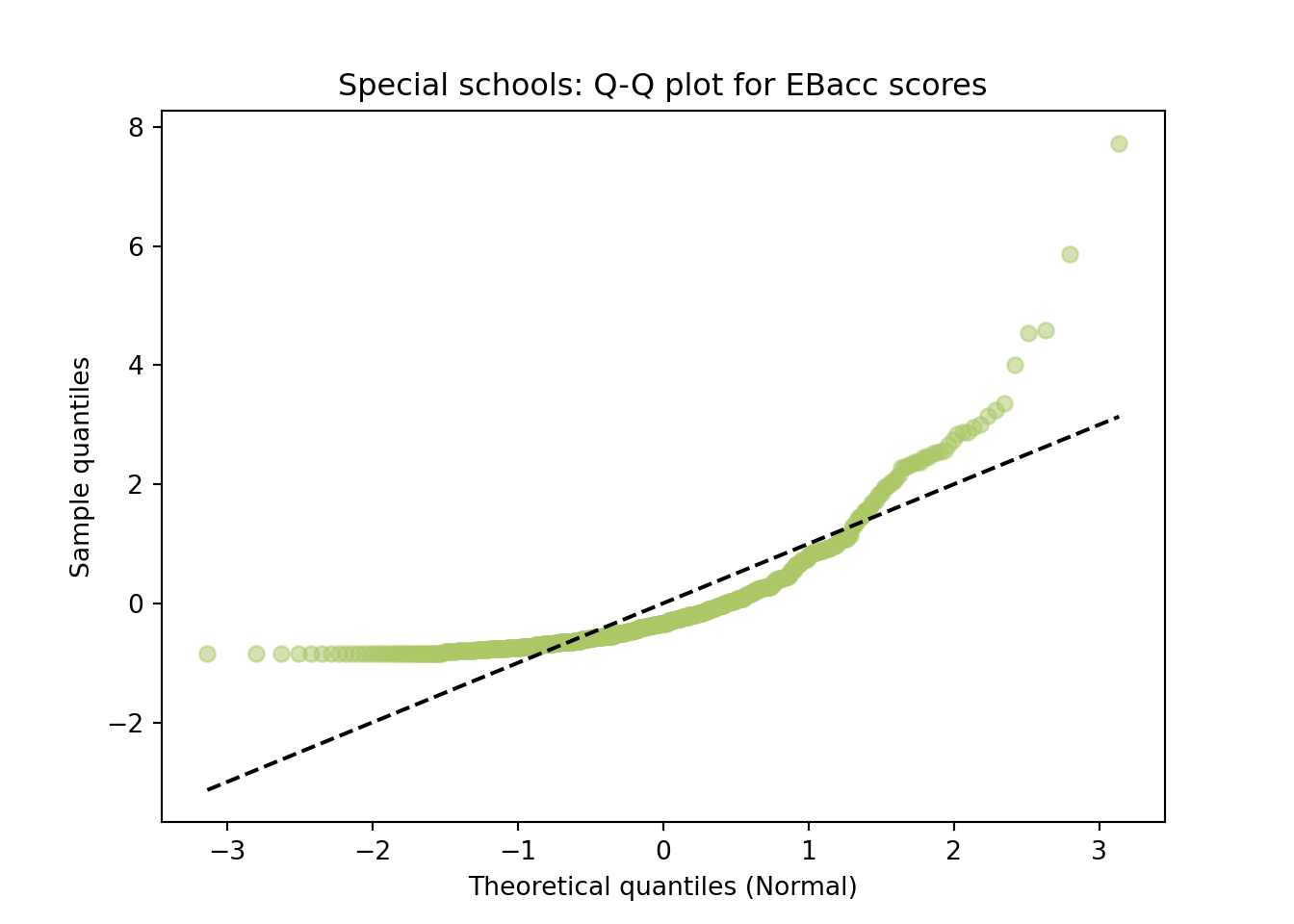
Looking at the resultant Q-Q plots what can we say about the data? We see that the mainstream schools is a skewed dataset, whilst the special schools dataset has a heavy tail.
Task 6 — Standardise with z-scores
So far we’ve described scores in their own units — an EBacc point. A z-score puts every value on a common scale instead - how many standard deviations a value sits from the mean.
\[z = \frac{x - \mu}{\sigma}\]
We’ve just seen that mainstream and special schools sit on quite different distributions, so we standardise mainstream schools (df1) against their own mean and standard deviation, rather than mixing the two populations together.
mu1 = df1['EBACCAPS'].dropna().mean()
std1 = df1['EBACCAPS'].dropna().std()

df1['EBACCAPS_z'] = (df1['EBACCAPS'] - mu1) / std1

df1[['SCHNAME', 'EBACCAPS', 'EBACCAPS_z']].dropna() \
  .sort_values('EBACCAPS_z', ascending=False) \
  .head(10)
SCHNAME EBACCAPS EBACCAPS_z
365 The Henrietta Barnett School 8.70 3.698521
867 Wilson's School 8.56 3.591566
383 Queen Elizabeth's School, Barnet 8.50 3.545729
481 St Olave's and St Saviour's Grammar School 8.37 3.446414
3496 Kendrick School 8.29 3.385297
1621 Altrincham Grammar School for Girls 8.19 3.308901
969 King Edward VI Camp Hill School for Boys 8.17 3.293622
742 The Tiffin Girls' School 8.16 3.285983
3835 Chelmsford County High School for Girls 8.13 3.263064
3503 Reading School 8.11 3.247785# A tibble: 10 × 3
SCHNAME EBACCAPS EBACCAPS_z
<chr> <dbl> <dbl>
1 The Henrietta Barnett School 8.7 3.70
2 Wilson's School 8.56 3.59
3 Queen Elizabeth's School, Barnet 8.5 3.55
4 St Olave's and St Saviour's Grammar School 8.37 3.45
5 Kendrick School 8.29 3.39
6 Altrincham Grammar School for Girls 8.19 3.31
7 King Edward VI Camp Hill School for Boys 8.17 3.29
8 The Tiffin Girls' School 8.16 3.29
9 Chelmsford County High School for Girls 8.13 3.26
10 Reading School 8.11 3.25That’s the ten mainstream schools furthest above the mean, in standard-deviation terms. z = 0 is a school scoring exactly the mean; z = 1 is one standard deviation above it.
Adapt the code above to find the ten schools furthest below the mean instead.
df1[['SCHNAME', 'EBACCAPS', 'EBACCAPS_z']].dropna() \
  .sort_values('EBACCAPS_z', ascending=??) \
.head(10)df1[['SCHNAME', 'EBACCAPS', 'EBACCAPS_z']].dropna() \
.sort_values('EBACCAPS_z', ascending=True) \
.head(10) SCHNAME EBACCAPS EBACCAPS_z
141 The Lloyd Williamson School Foundation 0.0 -2.947927
1276 Progress Schools - Toxteth 0.0 -2.947927
5210 Kings Education (Oxford) 0.0 -2.947927
5327 Brookes UK 0.0 -2.947927
3423 Maranatha Christian School 0.0 -2.947927
2770 Kings Bournemouth 0.0 -2.947927
1536 Beis Ruchel Girls School 0.0 -2.947927
301 Eifa International School 0.0 -2.947927
1064 The National Mathematics and Science College 0.0 -2.947927
2346 Learning4Life-GY 0.0 -2.947927Standardising doesn’t change the shape of a distribution, only its location and scale — everything just shifts to be centred on 0 with a spread of 1. You can see that by plotting the z-scores themselves:
plt.figure(figsize=(12, 6))
plt.hist(df1['EBACCAPS_z'].dropna(), bins=40, color='#abc766', edgecolor='black')
plt.axvline(0, color='black', linestyle='--')
plt.title('Standardised EBacc scores (z-scores), mainstream schools')
plt.xlabel('z-score')
plt.ylabel('Number of schools')

plt.show()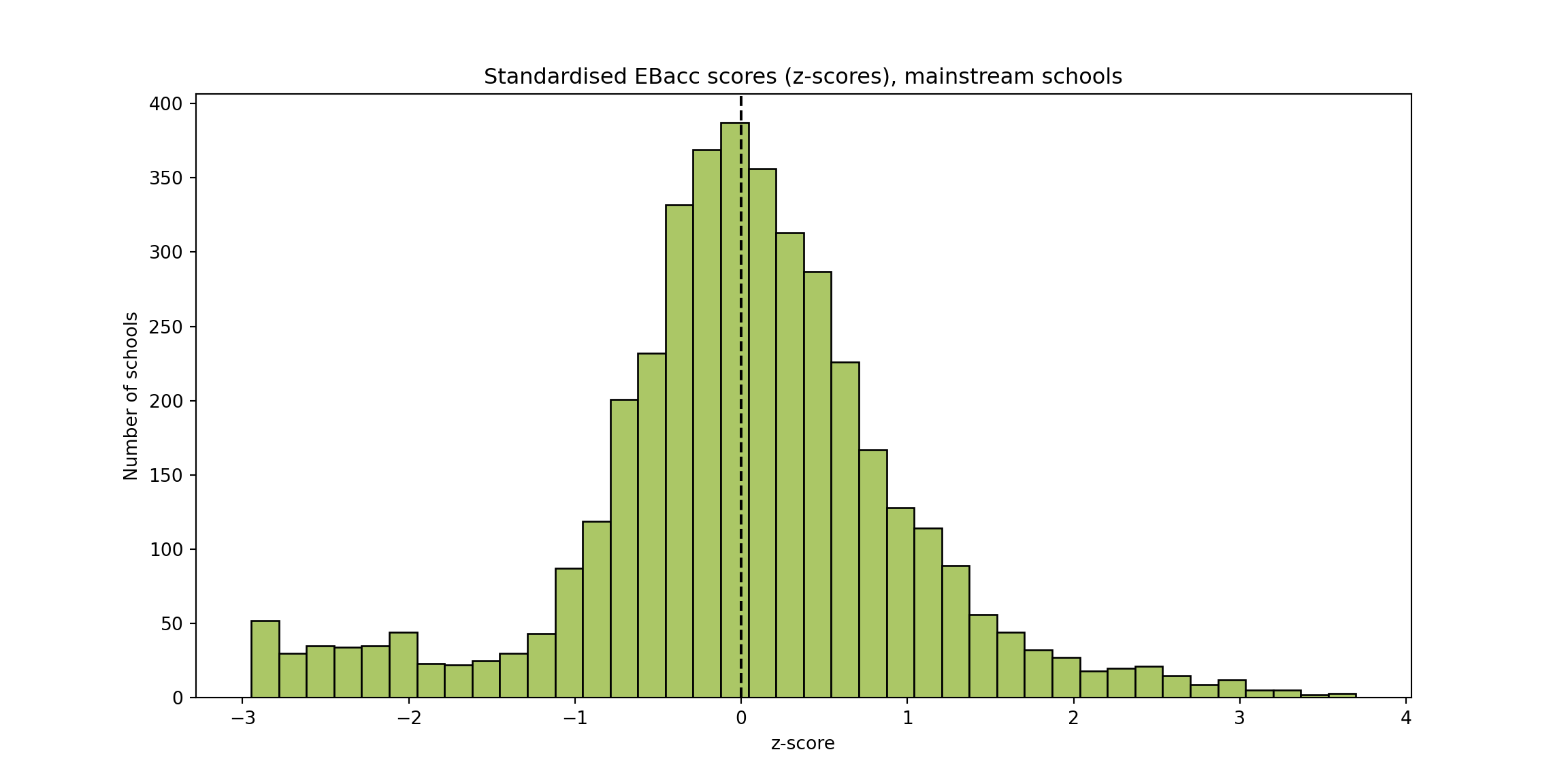
ggplot(df1, aes(x = EBACCAPS_z)) +
  geom_histogram(bins = 40, fill = "#abc766", colour = "black") +
  geom_vline(xintercept = 0, colour = "black", linetype = "dashed") +
  labs(title = "Standardised EBacc scores (z-scores), mainstream schools",
       x = "z-score", y = "Number of schools") +
  theme_minimal()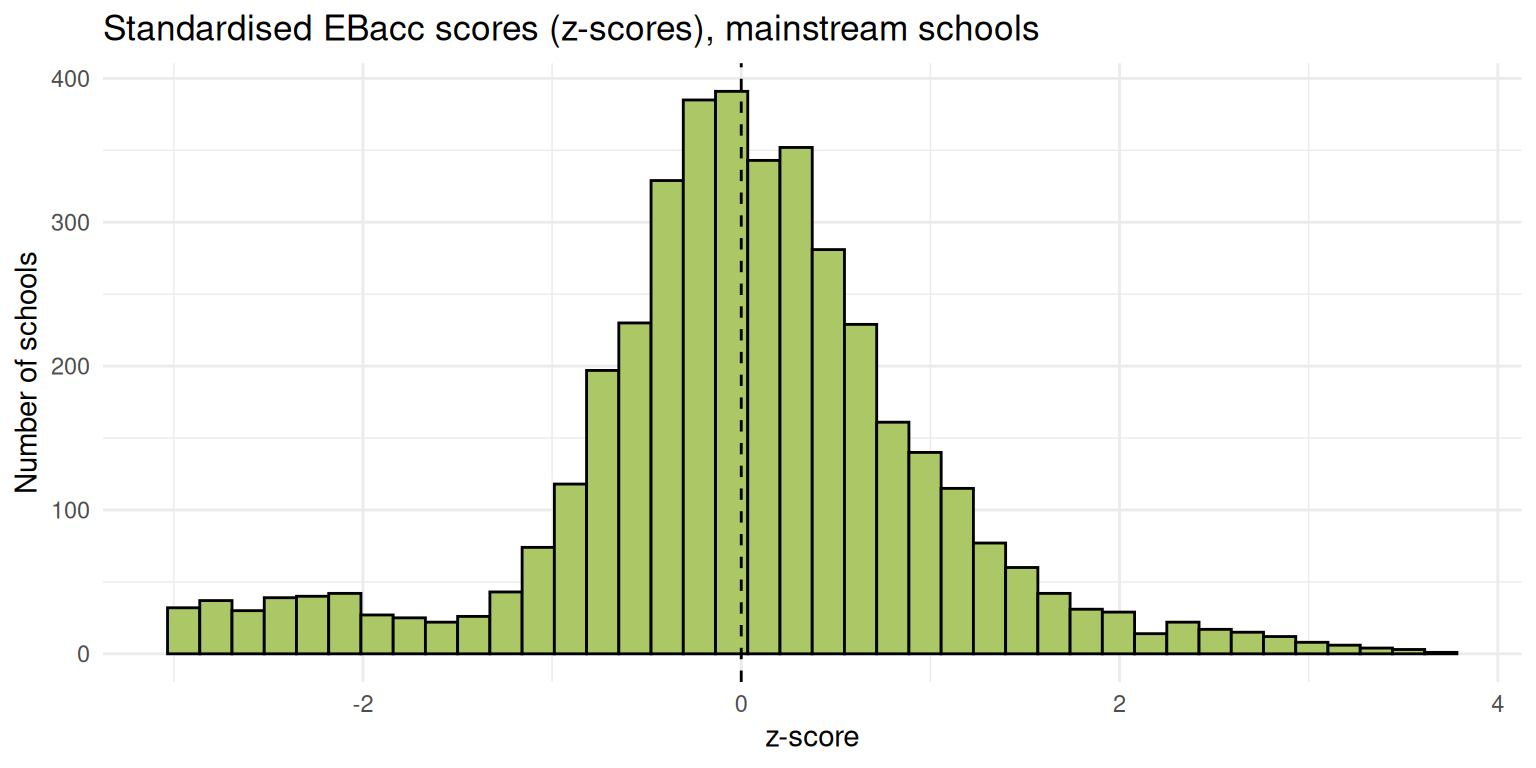
That’s the same mild skew you saw in the mainstream Q-Q plot above, just relabelled onto a scale centred on 0 with a spread of 1.
A common rule of thumb flags anything with \(|z| > 2\) as unusually far from the mean.
How many mainstream schools have \(|z| > 2\)?
(df1['EBACCAPS_z'].abs() > ??).sum()(df1['EBACCAPS_z'].abs() > 2).sum()np.int64(336)Task 7 — Calculate a probability from the normal distribution
If we’re willing to accept EBACCAPS is approximately normally distributed, we can answer questions like “what proportion of schools would we expect to score above 6.0?” using nothing but a mean and a standard deviation, without needing the raw data at all.
The Q-Q plots above showed the whole dataset is clearly not normal — but restricting to mainstream schools removed the second hump caused by special schools, which is why we’ve been standardising df1 rather than the full dataset since the z-scores section above. Even mainstream schools weren’t a perfect diagonal line on the Q-Q plot, but the whole point of the probaility distirbution to be able to aprpoximatethe data using a matehmatical distirbution, hence simplifying the analysis. So treat what follows as a working approximation, not a guarantee.
scipy.stats.norm gives us probabilities directly from those two numbers: .cdf(x, mu, std) returns \(P(X \leq x)\), and .sf(x, mu, std) (“survival function”) returns \(P(X > x)\), i.e. \(1 - \text{cdf}(x)\). In R, the equivalent is pnorm(x, mu, std) and pnorm(x, mu, std, lower.tail = FALSE).
threshold = 6.0

p_above = sps.norm.sf(threshold, mu1, std1)
print(f"Normal model:  P(EBacc > {threshold}) = {p_above:.3f}")
Normal model: P(EBacc > 6.0) = 0.051# how does that compare to what's actually in the data?
empirical = (df1['EBACCAPS'] > threshold).mean()
print(f"Raw sample: proportion of mainstream schools actually above {threshold} = {empirical:.3f}")Raw sample: proportion of mainstream schools actually above 6.0 = 0.044Normal model: P(EBacc > 6.0) = 0.051# how does that compare to what's actually in the data? na.rm = TRUE would
# drop missing rows from the denominator entirely; replace_na(..., FALSE)
# instead counts them as "not above threshold", matching pandas' behaviour
# (NaN > x is False, not NaN), so the two languages agree.
empirical <- mean(replace_na(df1$EBACCAPS > threshold, FALSE))
cat(sprintf("Raw sample: proportion of mainstream schools actually above %.1f = %.3f\n",
threshold, empirical))Raw sample: proportion of mainstream schools actually above 6.0 = 0.044Those two numbers should be reasonably close — much closer than they would be on the full, mixed dataset — but probably still not identical. That gap is the price of the normality assumption.
We can also find the probability of falling between two values, by subtracting one CDF from another: \(P(a < X < b) = \text{cdf}(b) - \text{cdf}(a)\).
What proportion of mainstream schools would the normal model predict scoring between 4 and 6 — and what proportion actually do, in the raw data?
lower, upper = 4, 6
p_between = sps.norm.cdf(??, mu1, std1) - sps.norm.cdf(??, mu1, std1)
print(f"Normal model:  P({lower} < EBacc < {upper}) = {p_between:.3f}")

# how does that compare to what's actually in the data?
empirical_between = ((df1['EBACCAPS'] > lower) & (df1['EBACCAPS'] < ??)).mean()
print(f"Raw sample:    proportion of mainstream schools actually between {lower} and {upper} = {empirical_between:.3f}")
lower, upper = 4, 6
p_between = sps.norm.cdf(upper, mu1, std1) - sps.norm.cdf(lower, mu1, std1)
print(f"Normal model: P({lower} < EBacc < {upper}) = {p_between:.3f}")Normal model: P(4 < EBacc < 6) = 0.406# how does that compare to what's actually in the data?
empirical_between = ((df1['EBACCAPS'] > lower) & (df1['EBACCAPS'] < upper)).mean()
print(f"Raw sample: proportion of mainstream schools actually between {lower} and {upper} = {empirical_between:.3f}")Raw sample: proportion of mainstream schools actually between 4 and 6 = 0.378As with the single-threshold example above, these two numbers should be close but not identical — the gap is the same price of the normality assumption.
Extension
EBacc by prior attainment
If you’ve finished looking at the histogram plots of the EBacc data, try plotting the histograms of the columns ‘EBACCAPS_LO’, ‘EBACCAPS_MID’, ‘EBACCAPS_HI’. What can you say about these data distributions? Does plotting the Q-Q plots help?
n_bins = ??
fig, ax = plt.subplots(3, 1, figsize=(12, 18))
plot_names = ['EBacc low prior', 'EBacc mid prior', 'EBacc high prior']

for i, col in ??:
    ax[i].hist(df[col].dropna(), bins=n_bins, color='#abc766', edgecolor='black')
    ax[i].set_title(plot_names[i])
    ax[i].set_xlabel('EBacc score')
    ax[i].set_ylabel('Number of schools')
    ax[i].set_xlim(0,9) # the EBacc has a maximum score of 9

plt.show()
n_bins = 40
fig, ax = plt.subplots(3, 1, figsize=(12, 18))
plot_names = ['EBacc low prior', 'EBacc mid prior', 'EBacc high prior']
for i, col in enumerate(['EBACCAPS_LO', 'EBACCAPS_MID', 'EBACCAPS_HI']):
ax[i].hist(df[col].dropna(), bins=n_bins, color='#abc766', edgecolor='black')
ax[i].set_title(plot_names[i])
ax[i].set_xlabel('EBacc score')
ax[i].set_ylabel('Number of schools')
ax[i].set_xlim(0,9) # the EBacc has a maximum score of 9(array([147., 64., 37., 39., 11., 17., 12., 7., 12., 30., 52.,
96., 166., 215., 273., 311., 418., 340., 318., 224., 203., 101.,
97., 80., 37., 38., 19., 14., 10., 6., 5., 1., 3.,
1., 0., 0., 0., 0., 1., 1.]), array([0. , 0.133, 0.266, 0.399, 0.532, 0.665, 0.798, 0.931, 1.064,
1.197, 1.33 , 1.463, 1.596, 1.729, 1.862, 1.995, 2.128, 2.261,
2.394, 2.527, 2.66 , 2.793, 2.926, 3.059, 3.192, 3.325, 3.458,
3.591, 3.724, 3.857, 3.99 , 4.123, 4.256, 4.389, 4.522, 4.655,
4.788, 4.921, 5.054, 5.187, 5.32 ]), <BarContainer object of 40 artists>)
Text(0.5, 1.0, 'EBacc low prior')
Text(0.5, 0, 'EBacc score')
Text(0, 0.5, 'Number of schools')
(0.0, 9.0)
(array([ 5., 10., 1., 4., 1., 3., 5., 3., 4., 3., 2.,
6., 10., 19., 35., 47., 105., 164., 224., 288., 356., 342.,
336., 308., 233., 199., 138., 108., 78., 61., 47., 33., 29.,
13., 13., 10., 9., 4., 8., 4.]), array([0.1 , 0.27675, 0.4535 , 0.63025, 0.807 , 0.98375, 1.1605 ,
1.33725, 1.514 , 1.69075, 1.8675 , 2.04425, 2.221 , 2.39775,
2.5745 , 2.75125, 2.928 , 3.10475, 3.2815 , 3.45825, 3.635 ,
3.81175, 3.9885 , 4.16525, 4.342 , 4.51875, 4.6955 , 4.87225,
5.049 , 5.22575, 5.4025 , 5.57925, 5.756 , 5.93275, 6.1095 ,
6.28625, 6.463 , 6.63975, 6.8165 , 6.99325, 7.17 ]), <BarContainer object of 40 artists>)
Text(0.5, 1.0, 'EBacc mid prior')
Text(0.5, 0, 'EBacc score')
Text(0, 0.5, 'Number of schools')
(0.0, 9.0)
(array([ 2., 0., 0., 1., 0., 1., 0., 2., 1., 1., 1.,
3., 7., 9., 15., 15., 26., 37., 80., 83., 132., 160.,
245., 264., 287., 335., 323., 264., 266., 207., 164., 98., 74.,
38., 13., 15., 10., 6., 3., 2.]), array([0.59 , 0.7935, 0.997 , 1.2005, 1.404 , 1.6075, 1.811 , 2.0145,
2.218 , 2.4215, 2.625 , 2.8285, 3.032 , 3.2355, 3.439 , 3.6425,
3.846 , 4.0495, 4.253 , 4.4565, 4.66 , 4.8635, 5.067 , 5.2705,
5.474 , 5.6775, 5.881 , 6.0845, 6.288 , 6.4915, 6.695 , 6.8985,
7.102 , 7.3055, 7.509 , 7.7125, 7.916 , 8.1195, 8.323 , 8.5265,
8.73 ]), <BarContainer object of 40 artists>)
Text(0.5, 1.0, 'EBacc high prior')
Text(0.5, 0, 'EBacc score')
Text(0, 0.5, 'Number of schools')
(0.0, 9.0)plt.show()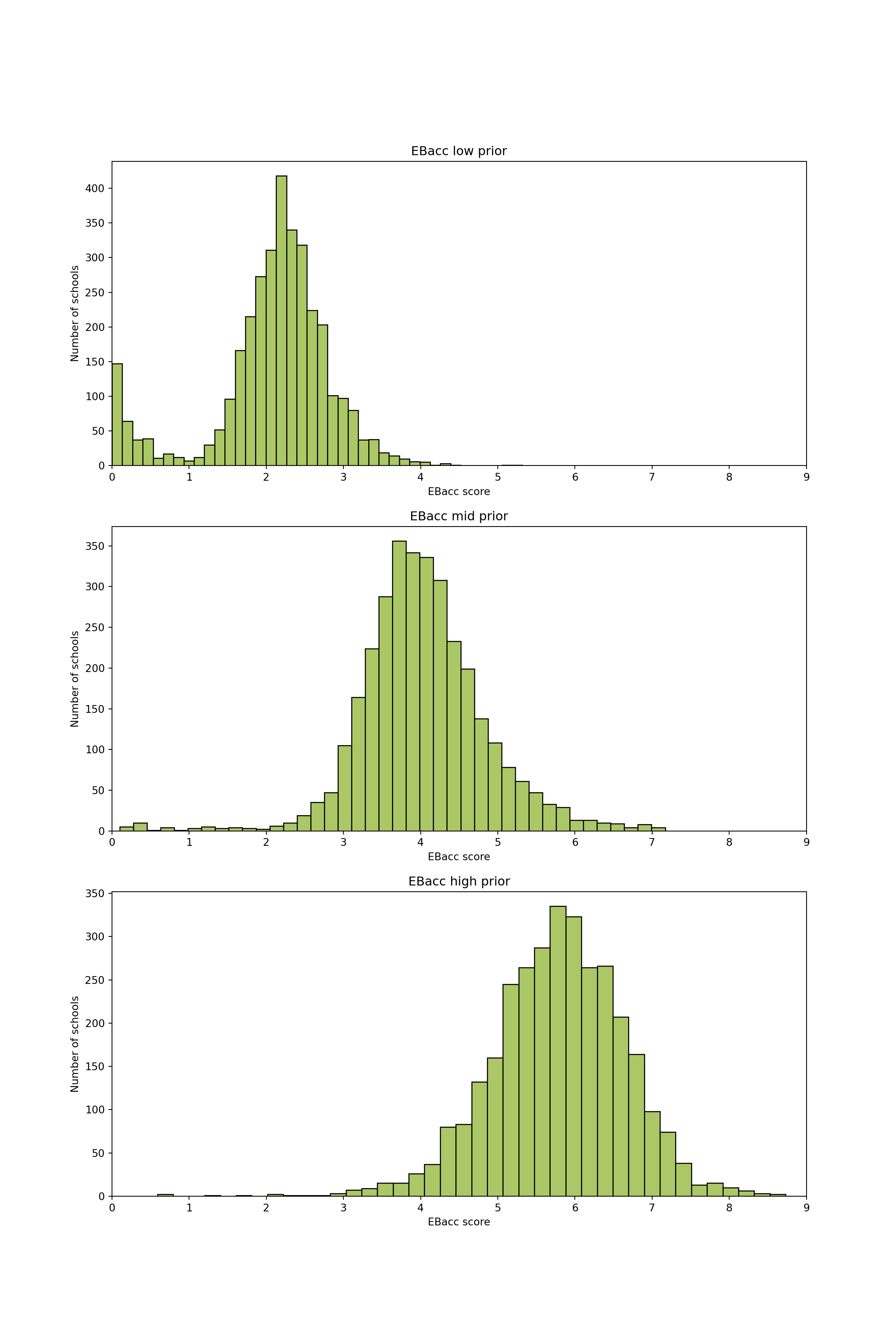
EBacc by school size
If you’ve finished everything else, then you might like to look at some of the other variables in the dataset. Try plotting the EBacc scores against the total number of pupils (‘TOTPUPS’) - for example using a scatter plot - what can you say about this distribution?
You’re Done!
You’ve completed the second QM practical session!
Don’t worry about understanding every detail of the Python code — what matters most is knowing which functions to use for a specific task and knowing how to debug when it goes wrong. Remember, practice makes perfect :)